
We have been using NDI cameras from fall 2022 until this spring when the most recent OBS release couldn’t find them. It turns out that the cameras were so old that they couldn’t deal with an NDI license if we bought them. We moved them to RTSP and were able to get reconnected.
We bought a new SMTAV camera attempted to use it through its NDI setting


The OBS computer has these Internet settings:

And the new camera has:

Which matches the network table shown above.
OBS however could not find the camera at that address when I added it as an NDI source.
Instead it found it through the “Static Fall Back Address” of 192.168.100.88

NDI Tools also cannot find the camera at the static address assigned, but found it at the 192.168.100.88 address.

How is this possible?
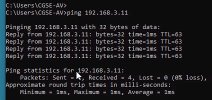
A ping to the Static Fall Back Address fails:

Inquiring minds want to know?
Here is the log URL: https://obsproject.com/logs/KEO12cYahHAYkr8E
We bought a new SMTAV camera attempted to use it through its NDI setting
The OBS computer has these Internet settings:
And the new camera has:
Which matches the network table shown above.
OBS however could not find the camera at that address when I added it as an NDI source.
Instead it found it through the “Static Fall Back Address” of 192.168.100.88
NDI Tools also cannot find the camera at the static address assigned, but found it at the 192.168.100.88 address.
How is this possible?
A ping to the Static Fall Back Address fails:
Inquiring minds want to know?
Here is the log URL: https://obsproject.com/logs/KEO12cYahHAYkr8E