
Day after Windows 2026-06 update and Audio is not working

abe2026

New Member
I have been using ONS for a few weeks now and I am a complete novice with this - but I have been able to video with record 5.1 sound all ok - but yesterday - I had to reboot the Windows11 PC with a new Windows Update (2026-06 Security Update (KB5094126) (26200.8655), and 2026-06 .NET 8.0.28 Security Update for x64 Client (KB5097149)) and now the 5.1 is not registering at all - and the other Audio Mixer sources are showing a white noise fluttering with no audible feed; I can use AverMedia Streaming Center and can hear the audio clearly - but I use this for Stereo rather than 5.1 surround.

View a recording of the problem here: https://streamable.com/3pycj3

Is there a fix?
Thanks in advance
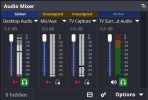
 

Attachments

  • Screenshot 2026-06-11 090424.png
    Screenshot 2026-06-11 090424.png
    23 KB · Views: 7
Ok - I think I fixed it (with a lot of back and forwards with chatgpt) - and I do believe it was the Windows update that caused it

What I think the problem was:
After the Windows security updates:
  • The capture card was still detected by USB
  • Video capture still worked
  • BUT the HDMI audio interface stopped being registered in Windows
This caused:
  • No capture audio device in Playback settings
  • ONS showing video but no usable audio (5.1 turned into noise)
  • AverMedia Streaming Center showing no available audio inputs
I also saw signs that:
  • Windows had fallen back to a generic USB driver binding
  • The AverMedia multichannel audio component was missing or not correctly re-attaching
  • Driver reinstall attempts did not force the audio endpoint to reappear
So the core issue was:
Windows had the device, but was not exposing the capture audio interface

The Fix

This went through several stages:

1. Cleaned driver confusion​

  • Uninstalled AverMedia driver components
  • Removed partial audio and plugin modules
  • Reset the device stack in Device Manager

2. Attempted software rebind​

  • Reinstalled Streaming Center + plugin
  • Verified device presence in Windows and ASC
  • Confirmed video still worked, but audio still missing

3. Forced Windows reset of the device​

  • Disabled/enabled device
  • Scan for hardware changes
  • Still no audio endpoint

4. Key step:​

  • Physically unplugged and reinserted the capture card. This forced a full USB re-enumeration at hardware level.
 
Back
Top