

- Supported Bit Versions
- 64-bit
- Source Code URL
- https://github.com/norihiro/obs-loudness-dock/
- Minimum OBS Studio Version
- 28.0.0
- Supported Platforms
- Windows
- macOS
- Linux
Summary
The Loudness Dock plugin provides a dock displaying EBU R 128 loudness meter.
The meter dock will display these loudness values for the audio track 1.
Usage
Click Docks on the menu, and click Loudness.

You will see a new dock appear.

For YouTube
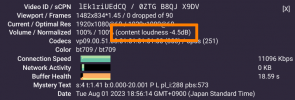
YouTube displays "Content loudness", which is calculated by the same algorithm. However, YouTube's content loudness is a relative number from YouTube's limit -14 LUFS. For example, if your loudness is -18.5 LUFS, YouTube will display -4.5 dB as the content loudness.
See also
The Loudness Dock plugin provides a dock displaying EBU R 128 loudness meter.
The meter dock will display these loudness values for the audio track 1.
- Momentary loudness
- Short term loudness
- Integrated loudness
- LRA
- True peak
Usage
Click Docks on the menu, and click Loudness.
You will see a new dock appear.
For YouTube
YouTube displays "Content loudness", which is calculated by the same algorithm. However, YouTube's content loudness is a relative number from YouTube's limit -14 LUFS. For example, if your loudness is -18.5 LUFS, YouTube will display -4.5 dB as the content loudness.
See also
- libebur128 - This plugin uses the libebur128. I acknowledge the author of the library.
- R 128 - Loudness Normalisation and permitted maximum level of audio signals, EBU.
- EBU R 128 on Wikipedia

